

Get in touch
If you need help setting up an account or making a phone call, or would like to leave feedback on the site or service, please don't hesitate to let us know.
Contact usIf you have a technical issue, for example you can not place calls or you need help setting up your incoming number/VoIP device, then please click on the following link to set up an email to the technical department Email us
Configure x-lite
X-Lite is a free SIP-based softphone that lets you make and receive calls on your PC or Mac. This guide describes how to configure your X-Lite installation to work with your Localphone account.
You can find your SIP registration details under the Internet Phone section of your Localphone Dashboard.
This guide has been tested with X-Lite version 5.0 for Windows, but the following steps will be compatible with other versions and platforms.
Add a New SIP Account
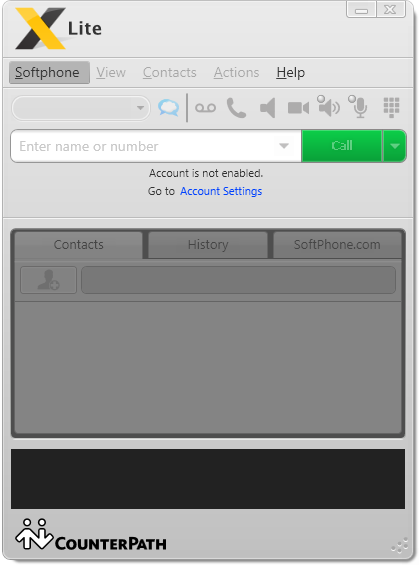
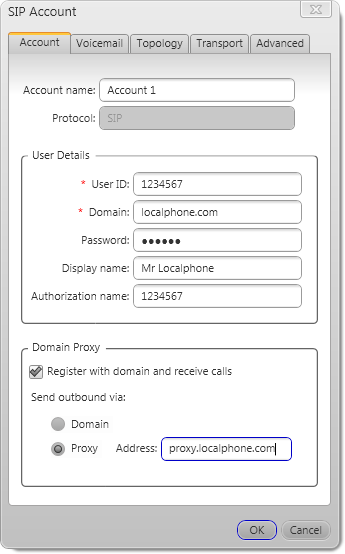
Enter Your Localphone Account Details
To find your Account Details navigate to Localphone.com and Log into your Account then navigate to Internet Phone please note your SIP Login and Password are NOT the same as your Localphone Account Username and Password:
Test Your Configuration
Press OK and close the SIP Accounts window. The main X-Lite window should read “Discovering network...”, and then after a short pause “Account enabled", the phone is ready
Following the steps above, you should now be able to connect to Localphone and make and receive calls. For further information about configuring X-Lite, or for help with troubleshooting, please see: